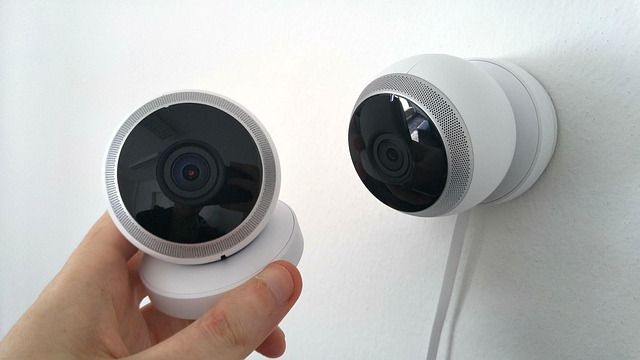
Short on time? Here’s the bottom line:
🔥 THE QUICK PICK – TP-Link Tapo C200
The Tapo C200 is the best-value indoor camera in the UK often under £40, no monthly fees, and perfect for renters.
As a renter, you don’t fully control who has keys to your front door. Landlords, letting agents, and maintenance contractors often have access rights.
While they should give 24 hours’ notice before entering, they don’t always do it. And if you have a pet at home, the anxiety of “Did the maintenance guy let the cat out?” is real.
An indoor camera isn’t just about catching burglars; it’s about accountability. It’s about knowing exactly who entered your flat and when.
But for renters, there are two massive hurdles:
- Mounting: You can’t drill holes in the ceiling to mount a CCTV dome.
- Privacy: You don’t want a camera recording you when you are relaxing at home.
We tested the best “Shelf-Standing” cameras that require zero installation, offer physical privacy shutters, and crucially save footage locally so you don’t have to pay a monthly subscription.

Comparison: The “Hidden Cost” Check
Most cheap cameras trap you into expensive monthly plans. Here is the breakdown of the real cost of ownership over 2 years.
| Feature | TP-Link Tapo C200 | Eufy Indoor Cam 2K | Ring Indoor Cam (2nd Gen) |
| Best For | Budget & Pets | AI & Privacy | Ring Users |
| Resolution | 1080p HD | 2K (Sharpest) | 1080p HD |
| Storage Cost | £0 (MicroSD Card) | £0 (MicroSD Card) | £4.99/month (Cloud) |
| Privacy Shield | Software (Lens hides) | Software (Lens hides) | Physical Shutter |
| Renter Rating | ⭐⭐⭐⭐⭐ | ⭐⭐⭐⭐⭐ | ⭐⭐⭐⭐ |
The “Shelf-Standing” Rule
Homeowners mount cameras in the top corners of the ceiling for the best view. Renters usually can’t do that.
You need a camera designed to sit on a Bookshelf, Fridge, or Sideboard.
- The Pan & Tilt Advantage: Because you are placing the camera low down (on a shelf), you might not see the whole room. We prioritise “Pan & Tilt” cameras (like the Tapo and Eufy) which have motors. You can swipe on your phone screen to physically spin the camera 360 degrees to check on your dog in the corner.
1. Top Pick: TP-Link Tapo C200 (The Budget King)
If you just want to know if the landlord actually came to fix the boiler, you don’t need to spend £100. The Tapo C200 is often under £40. It is the absolute best value piece of smart home tech available in the UK.
Why It’s Renter Friendly
- The “Privacy Mode”: When you are home, you can tap a button in the app. The camera lens physically rolls up inside the plastic casing. It looks like it’s sleeping. This gives you visual confirmation that it cannot see you.
- Local Storage: There is a slot on the camera for a MicroSD card (up to 128GB). It records everything onto that card. You pay £0 monthly fees.
Pros:
- Unbeatable price.
- 360-degree rotation covers the whole room from one shelf.
- Two-Way Audio (Shout at your dog to get off the sofa).
Cons:
The “Motion Detection” can be sensitive (moving shadows might trigger it).
1080p resolution is good, but license plates/text can be blurry at distance.
2. The Tech Pick: Eufy Indoor Cam 2K (Pan & Tilt)
If you want a camera that is smarter than you, get the Eufy. It uses on-device AI to understand what it is looking at.
Why It’s Renter Friendly
- AI Detection: The camera knows the difference between a “Human” (Landlord) and a “Pet” (Dog). You can set it to only notify you if it sees a Human. This stops your phone buzzing every time the cat walks past.
- Noise Activation: It can listen for specific sounds, like a baby crying. Perfect for parents renting in temporary accommodation.
- Apple HomeKit: One of the few budget cameras that integrates natively with Apple’s ecosystem for secure video.
Pros:
- 2K Resolution: Noticeably sharper than Tapo or Ring.
- Smart Tracking: The camera will physically swivel to follow a person walking across the room.
- No Monthly Fees: Local storage via SD card.
Cons:
- Slightly more expensive than Tapo.
3. The “Ecosystem” Pick: Ring Indoor Cam (2nd Gen)
If you already have the Ring Doorbell we recommended, this is the logical addition. It brings the security inside.
Why It’s Renter Friendly
- The Physical Shutter: This is the killer feature for shared housing. The 2nd Gen model has a manual plastic cover that you twist over the lens. When the cover is closed, the camera and microphone are physically cut off.
- Use Case: If you live in a flatshare, this is the only way to prove to your flatmates you aren’t recording them when you are all watching TV.
- Linked Devices: You can set it so that when your Ring Doorbell detects motion (someone at the door), this camera automatically starts recording inside, catching the entry.
Pros:
- Best “Privacy” hardware (Physical shutter).
- Great app interface.
Cons:
- Subscription Trap: You must pay £4.99/month to save videos. Without it, it is just a live-view camera.
- No Pan & Tilt (Fixed view).
Annotated Manual: Setting Up “Privacy Zones”
If your camera faces a shared area like a hallway in a flatshare or a window facing the street, you legally should not record it.
Most manuals glaze over this, but setting up a “Privacy Zone” is crucial for keeping the peace with housemates.
Step 1: Access Video Settings
Open the Tapo/Eufy app and go to Settings > Video & Display.
Step 2: Privacy Zones
Select “Privacy Zones”. You will see a still image of your room.
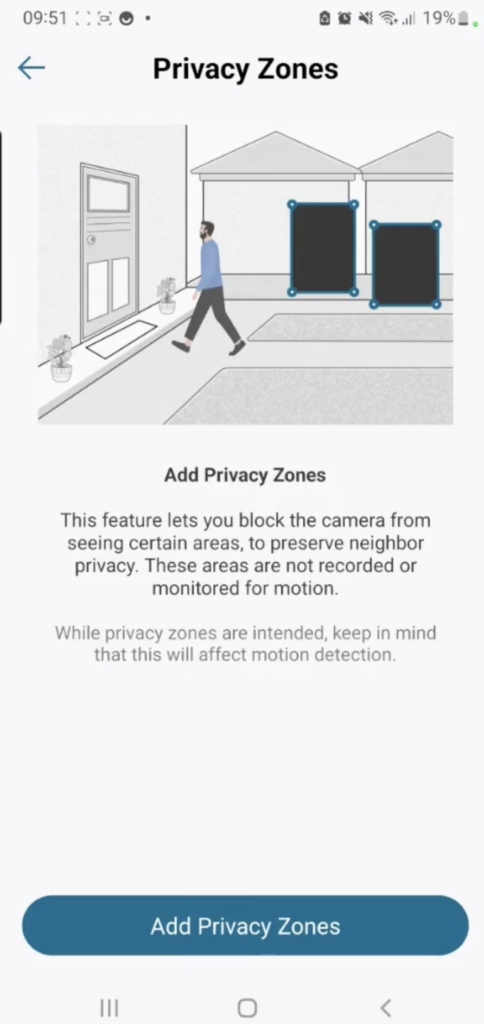
Step 3: Draw the “Black Box”
Use your finger to draw a box over the sensitive area (e.g., your flatmate’s bedroom door or the bathroom entrance).
- Manual Note: The manual often calls this “Masking.”
- The Result: The camera effectively “blindfolds” itself in that specific square. The final video will have a permanent black bar over that area.
Why do this?
If a housemate complains, show them the app. Show them the black box covering their door. It proves you respect their privacy while still securing your own room.
Real-World Reality: Community Feedback
We checked the Amazon reviews and Reddit threads to see where these cameras fail.
1. “Night Vision Reflection”
User Report: “I pointed the camera out of the window to watch my car. At night, all I see is a white glare.”
💡 The Smart Tenant Fix:
Cameras have Infrared (IR) LEDs for night vision. If you point them through glass, the IR light reflects back into the lens, blinding the camera.
Our Advice: You cannot use these through a window at night. You must turn off the “IR Night Vision” in the settings, but this means the street outside must be well-lit (streetlights) for you to see anything.
2. “The Wi-Fi Disconnect”
User Report: “My Tapo camera goes offline every time I use the microwave.”
💡 The Smart Tenant Fix:
These cameras use 2.4GHz Wi-Fi, which is the same frequency as microwaves and baby monitors.
Our Advice: Move the camera at least 5 feet away from the kitchen or your router. If it persists, buy a cheap Wi-Fi extender for the room the camera is in to boost the signal strength.
Frequently Asked Questions
Can I use these without Wi-Fi?
Yes and No. The Tapo and Eufy cameras will continue to record to the SD card if the Wi-Fi cuts out. However, you won’t get alerts on your phone, and you won’t be able to watch the live view until the internet comes back.
How much data does an SD card hold?
A 64GB MicroSD card (approx £15) will hold about 8 to 10 days of continuous 24/7 footage (loop recording). If you set it to “Motion Detection Only,” that same card could last months.
Does the camera make a noise?
When the Pan & Tilt cameras (Tapo/Eufy) move, there is a very quiet motor whir. It is barely audible unless the room is silent. The Ring Indoor Cam is silent as it doesn’t move.
Can I talk to my pet?
Yes. All three models have “Two-Way Audio.” You press a microphone button in the app and your voice comes out of the camera. Great for soothing a dog or scaring a burglar.
Verdict: The Best Renter Security
- Best Value: TP-Link Tapo C200. For under £40, getting a 360-degree camera with local storage is a steal. Buy a 64GB SanDisk card and you are set for years.
- Best for Privacy: Ring Indoor Cam (Gen 2). If you live with flatmates, the physical shutter is the ultimate “Do Not Disturb” sign.
- Best Tech: Eufy Indoor Cam 2K. If you want crisp video and AI that ignores your cat, this is the winner.