Short on time? Here’s the bottom line:
🔥 THE QUICK PICK – SwitchBot Smart Lock
The only smart lock that requires zero removal of landlord hardware. It uses high-torque motor tech to turn your existing key or thumbturn from the inside. It installs with 3M adhesive in 60 seconds and leaves no trace when removed on move-out day.
For most renters, the dream of having a smart lock ends the moment they read their tenancy agreement.
In the UK, rental contracts almost always forbid changing the locks. Landlords need emergency access, and most traditional smart locks require replacing the cylinder or drilling into the door. Both of which risk your deposit.
The good news is that in 2025, renters no longer need to change their locks to go keyless.
Retrofit smart locks install on the inside of your door, use your existing key or thumbturn, and can be removed without leaving a trace. We tested the best UK-compatible smart locks that install in under 10 minutes and work perfectly in rental properties.

Comparison: Best Smart Locks for UK Renters
Comparison of the best smart locks for renters in 2026
Why Most Smart Locks Don’t Work for UK Renters
Most smart locks sold in the UK are designed for homeowners, not renters.
They usually require removing the euro cylinder, changing the handle, or drilling into the door frame. Even if the lock itself is reversible, these changes almost always violate tenancy agreements.
For renters, the safest option is a smart lock that works without altering the door in any way.
Are Smart Locks Legal in UK Rental Properties?
In most UK rental properties, smart locks are legal as long as they do not permanently alter the door or prevent landlord access.
UK tenancy agreements usually include clauses that prohibit changing the locks or making permanent modifications. However, retrofit smart locks do not replace the cylinder, do not require drilling, and can be fully removed at the end of the tenancy without leaving damage.
Because the original lock remains intact and the landlord’s physical key continues to work, retrofit smart locks are generally considered acceptable under standard tenancy terms.
That said, renters should always check their individual agreement. If the contract specifically bans any devices attached to the door, it may be worth informing the landlord. In practice, most landlords are comfortable with retrofit smart locks once they understand that no permanent changes are involved.
Importantly, retrofit smart locks do not change access rights. Landlords cannot see entry logs or control the lock unless explicitly invited to the app. Their access remains exactly the same as before via the physical key.
Best Smart Locks for UK Renters (2025)
SwitchBot Lock Pro – Best Value for Renters
The SwitchBot Lock Pro is the best overall option for UK renters because it is affordable, easy to install, and extremely flexible.
It uses strong 3M adhesive tape to stick directly to the door surface, rather than clamping onto the cylinder. This allows it to work with almost any key shape or thumbturn.
The Pro version includes a physical dial and a quick-press button for locking and unlocking. When paired with the SwitchBot Hub, it also allows remote access and notifications.
Pros:
- Cheapest option
- Works with almost any UK door
- Optional fingerprint keypad
Cons list
• Bulky design
• Hub required for Wi-Fi access
Installation Process (Based on Manufacturer Instructions)
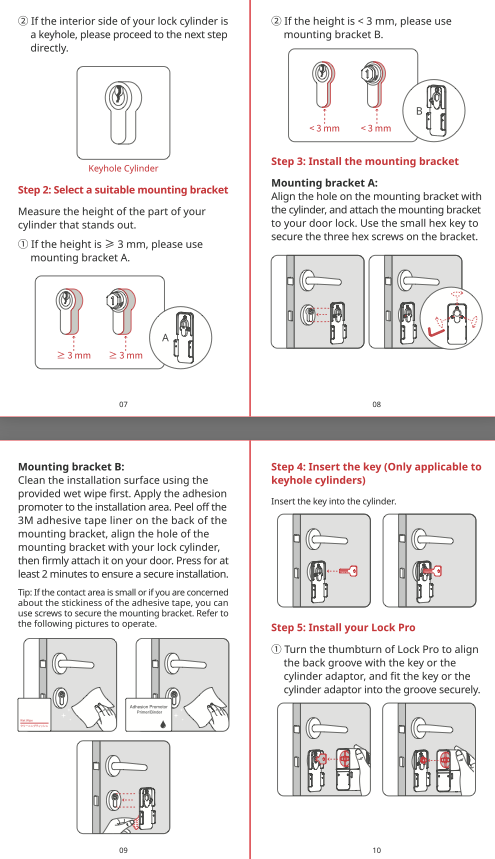
According to SwitchBot’s official installation guide, the Lock Pro is designed to be installed without tools or drilling.
The process involves inserting your existing key into the lock, attaching the smart lock body to the door using pre-applied 3M adhesive tape, and completing a short calibration sequence in the SwitchBot app.
Because the device mounts to the door surface rather than clamping onto the cylinder, it is compatible with a wide range of UK door handles and key shapes. SwitchBot states that the installation typically takes around five minutes, making it one of the fastest retrofit smart locks to set up in a rental property.
Yale Linus Smart Lock L2 – Best Premium Option
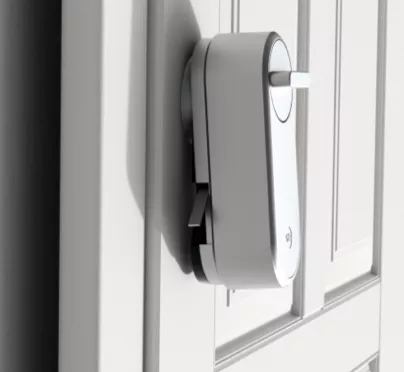
The Yale Linus L2 is a premium smart lock from one of the most trusted security brands in the UK.
It installs by clamping securely onto the existing cylinder, creating a solid and professional feel. Unlike earlier versions, the L2 includes built-in Wi-Fi, so no separate hub is required.
Yale’s DoorSense technology detects whether the door is fully closed, preventing the lock from engaging when the door is ajar.
Pros:
- Premium metal build
- Built-in Wi-Fi
- Quiet motor
Cons:
- Expensive
- Large size may not suit all doors
Installation Process (Based on Manufacturer Instructions)
Yale’s installation instructions for the Linus Smart Lock L2 describe a clamp-on mounting system that attaches directly to the existing euro cylinder from the inside of the door.
Installation requires tightening the lock body onto the cylinder using the supplied Allen key, followed by calibration through the Yale Home app. The process does not involve drilling or removing the cylinder.
Yale advises checking clearance above the door handle before installation, as the Linus L2 has a taller body than some competing smart locks. Built-in Wi-Fi is configured during the app setup, with no additional bridge required.
Nuki Smart Lock 4.0 – Best for Apple & Smart Homes
The Nuki Smart Lock 4.0 is ideal for renters who use Apple HomeKit or advanced smart-home setups.
It offers both clamp-on and adhesive installation options, making it suitable for a wide range of UK rental doors. Its standout feature is Auto-Unlock, which unlocks the door automatically as you approach with your phone.
The Pro version adds built-in Wi-Fi and Matter support for full smart-home integration.
Pros:
- Excellent smart-home support
- Auto-Unlock feature
- Fast unlocking
Cons:
- Wi-Fi requires Pro version
- Industrial design
Installation Process (Based on Manufacturer Instructions)
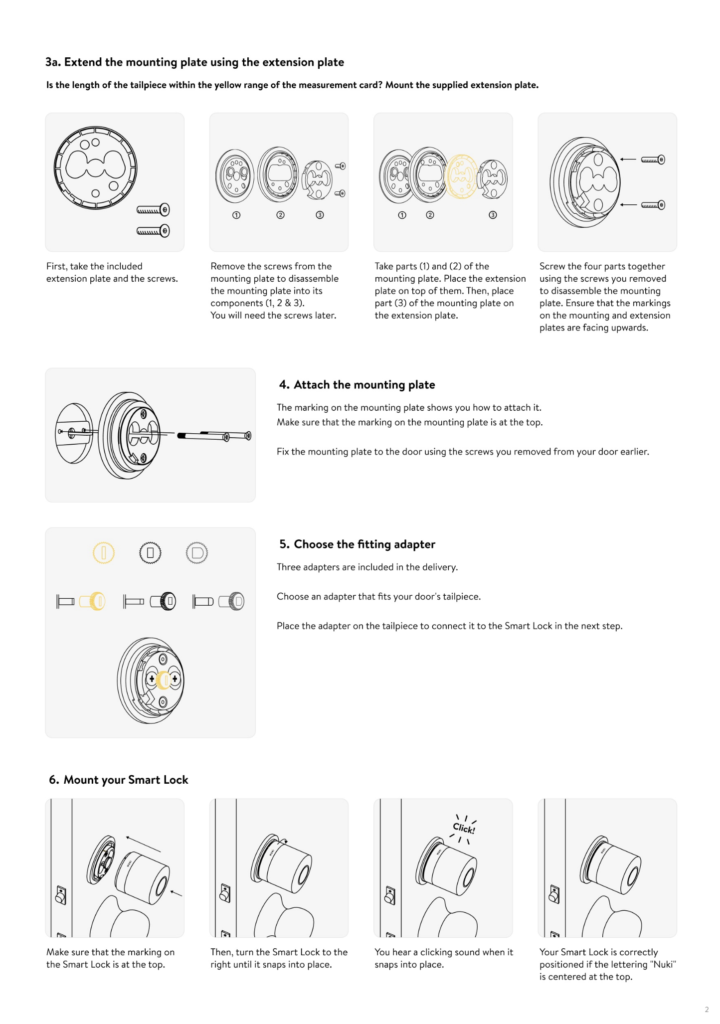
According to Nuki’s official documentation, the Smart Lock 4.0 offers two installation methods depending on the door setup: a clamp-on mount for protruding cylinders or an adhesive mounting plate for flush cylinders.
Once mounted, the lock is calibrated via the Nuki app to match the door’s locking mechanism. Nuki states that setup typically takes under ten minutes and does not require any permanent modification to the door.
The manufacturer highlights Auto-Unlock and Matter compatibility as optional features that can be enabled after installation, particularly on the Pro version with built-in Wi-Fi.
Will a Smart Lock Fit My Rental Door?
Step 1: The Dual-Clutch Test
If your door uses a key on the inside, insert a key on both sides of the door at the same time. If the outside key still turns, your cylinder supports double-clutch operation and is safe for a smart lock.
Step 2: Measure Clearance Around the Handle
Measure the distance between the centre of the keyhole and the door handle. Most smart locks require around 3 to 4 centimetres of clearance to rotate freely.
Frequently Asked Questions
Can my landlord see when I enter the house?
No. These locks connect to your Wi-Fi and your phone. The landlord has no access to the app unless you invite them. However, their physical key will still work from the outside, so their access rights don’t change.
What happens if the battery dies?
You will get notifications on your phone for weeks before it dies. If it runs completely flat, you can still use your physical key from the outside to open the door (just like normal).
Can I use this on a communal front door?
No. These are for your specific flat door only. Do not install these on the main building entrance door, as you cannot guarantee other residents will be able to use it.
Is it easy to remove?
Yes. The SwitchBot uses 3M tape which can be removed with a hairdryer (to melt the glue) and a piece of dental floss (to slice through the foam). The Yale and Nuki clamp versions unscrew in seconds with an Allen key.
Can my landlord ban me from using a smart lock?
A landlord can prohibit changes to the lock or door, but retrofit smart locks do not change the cylinder or structure. In most cases, they are allowed as long as the original lock remains functional and accessible with a physical key.
Do smart locks affect home insurance?
Retrofit smart locks do not usually affect insurance because the original lock remains in place. However, insurers may require that the physical lock still meets their security standards, which is the case with all locks in this guide.
What happens if my Wi-Fi goes down?
All retrofit smart locks continue to work via Bluetooth even without Wi-Fi. You can also always unlock the door using the physical key from the outside.
Verdict: Which Smart Lock Should UK Renters Buy?
For most UK renters, the SwitchBot Lock Pro offers the best balance of price, compatibility, and ease of installation.
If you want a premium build with built-in Wi-Fi, the Yale Linus L2 is the best choice. Apple and smart-home users will get the most value from the Nuki Smart Lock 4.0.
Essential Add-On: Ring No-Drill Mount. Do not ruin your uPVC front door with screws. If you buy the Ring, you must buy this official weather-proof adhesive plate. It holds the heavy camera securely through UK winters and peels off flawlessly when your tenancy ends.
All three options allow renters to enjoy keyless entry without changing the lock or risking their deposit.