
There is something undeniably luxurious about waking up to natural sunlight because your curtains opened themselves. It feels like living in a 5-star hotel.
But for UK renters, “electric curtains” usually mean expensive, custom-fitted motorised tracks that require drilling into the lintel and wiring into the mains. That is an instant eviction notice waiting to happen.
The solution? Retrofit Curtain Robots.
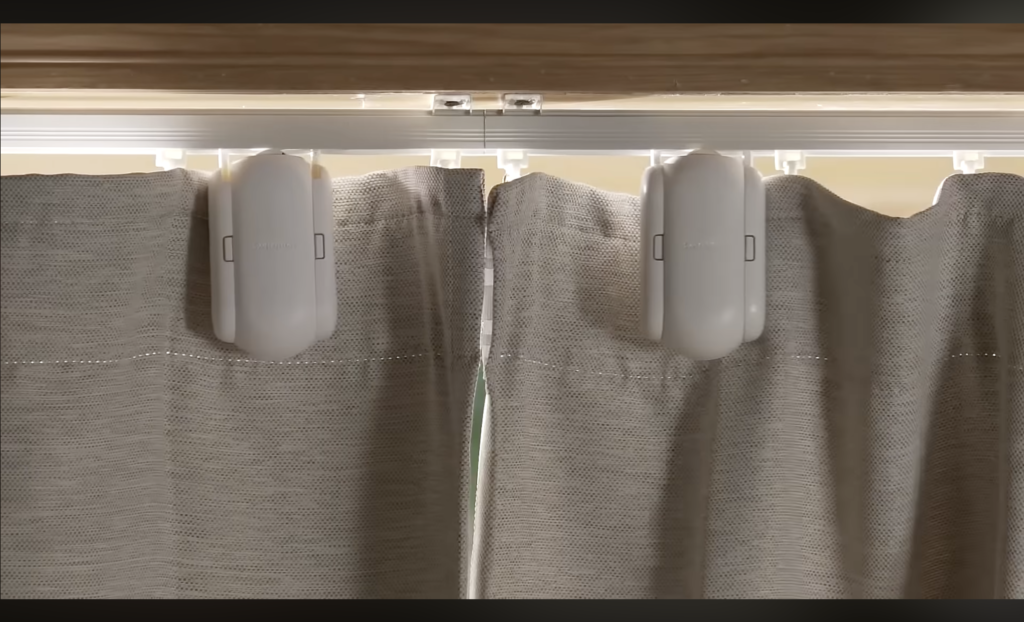
These are small battery-powered devices that hide behind your existing curtains. They clamp onto your current rail or pole and physically push the fabric back and forth.
We tested the market leaders to see which ones handle heavy velvet curtains, navigate tricky extendable poles, and most importantly install without leaving a mark.
Quick Comparison: The Retrofit Rivals
| Feature | SwitchBot Curtain 3 (Rod) | SwitchBot Curtain 3 (U-Rail) | Aqara Curtain Driver E1 |
| Best For | Round Poles | Plastic Tracks (U-Rail) | Zigbee Users |
| Max Load | 15kg (Heavy Duty) | 15kg (Heavy Duty) | 12kg |
| Noise Level | 25dB (Quiet Mode) | 25dB (Quiet Mode) | 30dB |
| Battery Life | 8 Months (or Forever with Solar) | 8 Months | 12 Months |
| Renter Rating | ⭐⭐⭐⭐⭐ | ⭐⭐⭐⭐⭐ | ⭐⭐⭐⭐ |
The “Rail Test”: Which Version Do You Need?
Before you buy, look up at your window. In the UK, you likely have one of two setups. You must buy the correct robot version, or it won’t fit.
1. The Curtain Pole (Rod)
- What it is: A round wooden or metal pole with rings sliding along it.
- You need: The SwitchBot Curtain 3 (Rod 2.0).
- How it works: It has two arms that hug the pole from the top and a wheel that runs along the bottom.
2. The U-Rail (Track)
- What it is: A white plastic or metal track mounted to the ceiling. Small plastic clips (gliders) hang inside it.
- You need: The SwitchBot Curtain 3 (U-Rail).
- How it works: It inserts small hooks into the track itself and drags itself along.
Top Pick: SwitchBot Curtain 3
The SwitchBot Curtain 3 is the gold standard. The previous “Curtain 2” was good, but it struggled with heavy thermal curtains and awkward extendable poles. The new “Version 3” fixes almost every gripe renters had.
Why It’s Renter Friendly
Zero tools required. Whether you have the Rod or U-Rail version, the mechanism is spring-loaded. You literally squeeze the device, clip it onto the rail behind your curtain, and let go. It hides completely behind the fabric (on the window side), so nobody knows it’s there.
The “Quiet Drift” Mode
Old smart curtains sounded like a remote control car. A loud whirrrr that woke you up instantly.
SwitchBot 3 has a “QuietDrift” mode. It moves the curtain incredibly slowly (taking 2 minutes to open). It is virtually silent. You just wake up and realise the room is bright, without hearing a motor.
Solar Charging (The Lazy Option)
If your window gets decent light, you can clip on the SwitchBot Solar Panel 3 (sold separately). It hangs down the back of the curtain facing the glass. In the UK, this won’t keep it 100% charged in December, but it drastically extends the battery life so you only charge it once a year.
Pros:
- Strong Motor: Pushes up to 15kg (enough for floor-to-ceiling velvet).
- QuietDrift: Silent wake-up feature is a game changer.
- Universal: Fits almost any UK pole diameter (15mm–40mm).
Cons:
- Price: Buying two (for a pair of curtains) gets expensive (£150+).
- Hub Needed: Requires a SwitchBot Hub Mini if you want to control it when you aren’t home (e.g., for security automation).
Installation Guide: Dealing with “Extendable Poles”
The biggest headache for UK renters is the “Telescopic Pole.”
These are cheap curtain rods that extend by sliding a thinner pole inside a thicker one. This creates a “bump” or “lip” in the middle. Old robots used to get stuck on this bump.
Here is how to install the SwitchBot 3 so it survives the bump:
Step 1: The “Joiner” Clip
In the box, SwitchBot provides a smooth metal “connector” sticker.
Peel the backing off and wrap this metal sheet around the “bump” on your pole. This creates a smooth ramp for the robot’s wheels to drive over.
SwitchBot includes a metal ‘transition strip’ to help the robot glide over extendable pole joints.
Step 2: Tension Calibration
Open the SwitchBot App. It will ask you to squeeze the robot tight against the pole.
Don’t over-tighten it! If it’s too tight, the battery drains faster. Use the “Auto-Calibrate” feature in the app which measures the friction for you.
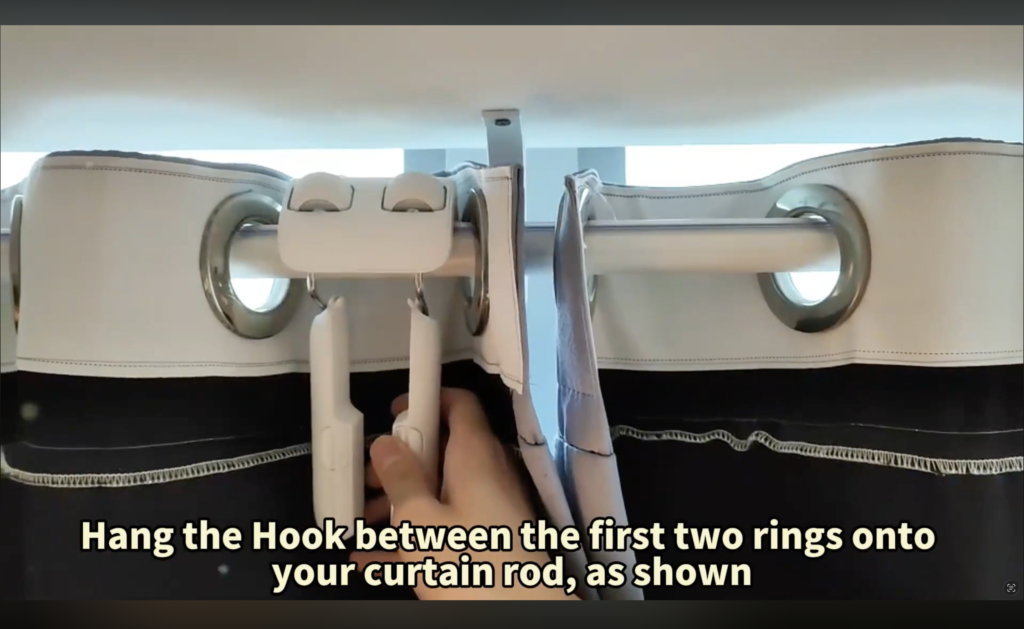
Step 3: Hide the Robot
Place the robot between the first and second curtain ring.
This ensures that as the robot moves, it pulls the first ring (and the rest of the curtain) with it, while staying completely hidden behind the pleats.
Real-World Reality: What Reddit & Forums Say
We scoured r/HomeAutomation, YouTube comments, and UK smart home forums to see how these devices perform after 6 months. Here are the common patterns condensed for you:
The “Winter Solar” Issue
User Report: “My solar panel works great in July, but by December in the UK, it barely holds a charge. I have to plug it in manually.” — r/HomeAutomation
The Smart Tenant Fix:
Don’t rely on the solar panel 100% in a British winter. It helps, but it won’t work miracles on a gloomy Tuesday in Manchester.
Our Advice: Expect to take the unit down once per winter to charge via USB-C. In summer, you can forget about it.
The “Slippery Pole” Glitch
User Report: “I have polished chrome poles. The robot just spins its wheels and the curtain doesn’t move.” — Amazon Review
The Smart Tenant Fix:
This happens on smooth metal rails. SwitchBot knows this, and they now include “Grip Beads” (a strip of invisible textured tape) in the box.
Our Advice: Do not throw the box away! Apply that tape along the top of your rail immediately. It gives the wheels the traction they need.
The “Light Gap” Drift
User Report: “After about 3 months, the curtain stops about an inch short of the wall, letting light in.” — AVForums
The Smart Tenant Fix:
This is “Software Drift.” Over hundreds of runs, the robot loses track of its position slightly.
Our Advice: Set a calendar reminder every 3 months. Go into the app -> Settings -> Re-Calibrate. It takes 30 seconds and fixes the gap instantly.
Runner Up: Aqara Curtain Driver E1
If you already use a Zigbee smart home setup (like Home Assistant or the Aqara Hub), the Aqara E1 is a fantastic alternative.
Why consider it?
It is often £10–£20 cheaper than SwitchBot and integrates natively with Apple HomeKit without needing as many bridges. However, its payload is lower (12kg), and users report it struggles more with the “telescopic pole bumps” than the new SwitchBot 3.
Verdict: Is It Worth The Cost?
Smart curtains are a luxury, not a necessity. But for a renter who can’t install blinds, they are a massive quality-of-life upgrade.
- Best for Most Renters: SwitchBot Curtain 3 (Rod). It is powerful, quiet, and the new design finally solves the “telescopic pole” issue that plagues rental homes.
- Best for Track Systems: SwitchBot Curtain 3 (U-Rail). If you have plastic ceiling tracks, this is the only reliable option.
- Essential Add-On: Don’t forget the SwitchBot Hub Mini if you want to connect it to Alexa or Google Home.
Frequently Asked Questions
Will this work on eyelet curtains (rings inside the fabric)?
It is tricky. Eyelet curtains naturally fold in a way that can block the robot. SwitchBot sells a specific “Eyelet Adapter” kit that spaces the folds out, but it looks a bit messy. These robots work best on Ring-top or Pleated curtains.
Is the motor loud?
In “Performance Mode,” you can hear a whirring sound (about 40dB). In “QuietDrift Mode,” it is nearly silent (25dB), but moves much slower. We recommend scheduling QuietDrift for your morning wake-up.
Do I need two robots for one window?
Yes, if your curtains split in the middle (a pair). You need one robot for the left side and one for the right. You can “group” them in the app so they open/close exactly in sync. If you have one single curtain panel that slides all the way across, you only need one robot.
Can I still pull the curtains by hand?
Yes. The device detects when you physically pull the fabric (called “Touch & Go”) and will automatically kick in to finish the job for you.