Short on time? Here’s the bottom line:
🔥 THE QUICK PICK – Anker Nebula Capsule 3
This is the clinical choice for renters who want a 100 inch screen without a permanent TV fixture. It is roughly the size of a soda can, features a built in battery, and utilises “Autofocus” technology to project a perfect image on any flat rental wall or ceiling. It requires zero mounting hardware, making it 100 percent deposit safe and easy to pack away for your next move.
If you rent a flat, you know the “Big TV” dilemma.
You want a 65-inch screen for movie nights. But you can’t mount it on the wall because the plasterboard is weak and drilling holes is forbidden. So, you end up with a massive black rectangle taking up huge amounts of floor space on a TV stand.
The solution? The Portable Smart Projector.
These aren’t the loud, hot office projectors from school. These are “Lifestyle Projectors.” They are the size of a Bluetooth speaker, run on batteries, and have built-in smart apps (Netflix, YouTube, Disney+).
Best of all: Zero Footprint.
You point it at a white wall, watch a 100-inch movie, and when you’re done, you put the “TV” away in a drawer. No heavy lifting, no wall damage.
We tested the best options to see which ones are bright enough for a living room, which ones automatically straighten the image (Auto-Keystone), and which ones actually sound good.
Visual Comparison: The “Coke Can” Cinemas
| Spec | Anker Nebula Capsule 3 | Samsung The Freestyle (Gen 2) | XGIMI MoGo 2 Pro |
| Best For | Ultimate Portability | Ceiling Watching | Sound & Picture |
| Size | Coke Can Sized | Rotating Barrel | Small Box |
| Brightness | 200 ANSI Lumens | 230 ANSI Lumens | 400 ISO Lumens |
| Battery? | ✅ Yes (2.5 Hours) | ❌ (Needs Power Bank) | ❌ (Mains Only) |
| OS | Google TV | Tizen (Samsung TV) | Android TV 11.0 |
| Renter Rating | ⭐⭐⭐⭐⭐ | ⭐⭐⭐⭐⭐ | ⭐⭐⭐⭐ |
The “ANSI Lumen” Reality Check
Before you buy, ignore the “Lux” number cheap brands use. Look for ANSI Lumens (or ISO Lumens).
- 100-200 Lumens: Needs a pitch-black room (blackout curtains required).
- 400-600 Lumens: Viewable in dim light (evening with curtains drawn).
- 1000+ Lumens: Viewable in daylight (these cost £1,000+ and aren’t portable).
Note: The projectors below are for Dark Rooms. Do not expect to watch football with the sun streaming in.
1. Top Pick: Anker Nebula Capsule 3
Nebula (by Anker) invented this category. The Capsule 3 is the size of a can of Guinness. It is the ultimate renter gadget because it fits in a drawer.
Why It’s Renter Friendly
- The Battery: It has a built-in battery lasting 2.5 hours (enough for Dune Part 1). You don’t need to trail power cables across the living room floor.
- Google TV: It runs the same software as a Chromecast. It’s snappy, easy to use, and supports almost every app.
The “Auto-Correction” Magic
Renters rarely have a dedicated cinema room. You are probably putting this on a stack of books or a coffee table.
The Capsule 3 has Auto-Keystone. You can point it at the wall from a weird angle, and within 3 seconds, it automatically snaps the picture into a perfect rectangle. No manual fiddling required.
Pros:
- Incredible portability (literally pocket-sized).
- Great picture quality (1080p) for the size.
- Also acts as a standalone Bluetooth speaker.
Cons:
- Not the brightest (needs a dark room).
- Expensive (~£400+).
2. The “Lazy” Pick: Samsung The Freestyle (Gen 2)
If you want to watch movies on the ceiling while lying in bed, this is the only choice.
Why It’s Renter Friendly
- The Stand: It comes on a 180-degree rotating cradle. You can point it at the wall, click it up to the ceiling, or angle it at a sloping roof. It automatically levels the image instantly.
- Samsung TV OS: If you have a Samsung TV, the menu is identical. It also includes “Samsung Gaming Hub,” allowing you to stream Xbox games without a console (if your internet is fast enough).
The Socket Accessory
Samsung sells an ingenious (but extra cost) adapter that lets you plug the projector directly into a lightbulb socket. Perfect for weird rental layouts where you have a lamp but no table.
Pros:
- Easiest setup of any projector ever made.
- Ceiling projection is a game changer for bedrooms.
- Good sound quality (360 degrees).
Cons:
- No internal battery: You must plug it into the wall or buy a separate battery base (expensive).
- Micro-HDMI port requires a special cable.
3. The Quality Pick: XGIMI MoGo 2 Pro
If you care more about picture quality than battery life, the XGIMI beats the others on brightness.
Why It’s Renter Friendly
- 400 ISO Lumens: It is significantly brighter than the Nebula or Samsung. The colours pop more, and you get a clearer image if there is a bit of ambient light (like a streetlamp outside).
- Eye Protection: If you walk in front of the lens (in a small flat), it detects your body and instantly dims the laser to protect your eyes. Great if you have pets or kids.
Pros:
- Best picture quality in this price range.
- Excellent built-in speakers.
- USB-C powered (can run off a powerful laptop charger).
Cons:
- No Battery: It must be plugged in (unless you have a massive 65W power bank).
- Physically larger than the Nebula.
Annotated Manual: The “Netflix Licensing” Workaround
The Problem:
You unbox your £400 projector. You go to the standard Google Play Store. You search “Netflix.” It isn’t there.
This is because Netflix requires specific certification that many portable projectors don’t have.
The Fix:
Nebula has added a hidden shortcut to fix this. Here is exactly where to find it, based on the screenshot above.
Step 1: Open “Nebula Play”
Do not go to the Google Play Store. Instead, open the app called Nebula Play (it is usually pre-installed on the home screen).
Step 2: Go to the “Tips” Menu
Navigate to the “Tips” tab at the top of the screen. You will see a large card explicitly labeled “Netflix Installation” (as shown in the image below).
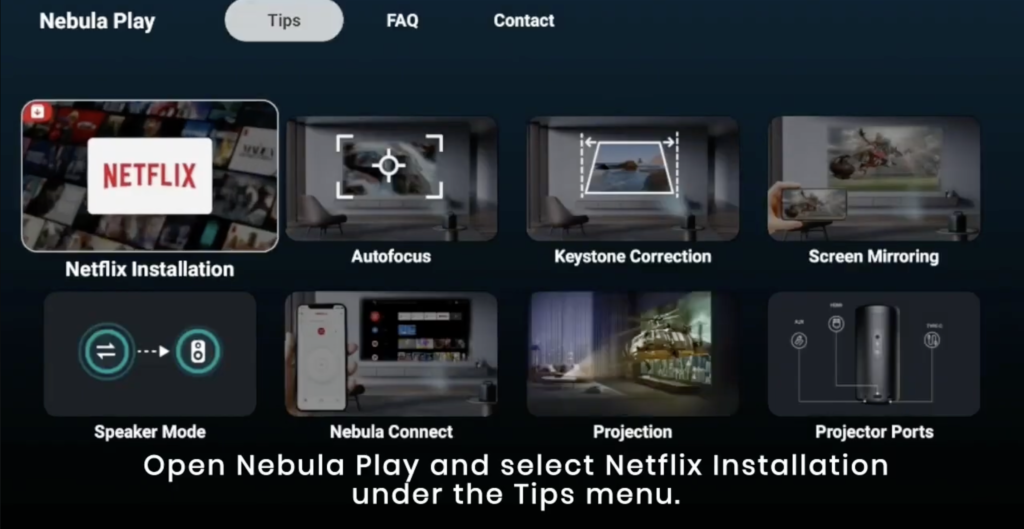
Step 3: Follow the Prompts
Click that card. It will automatically download the correct “Mobile Version” of Netflix that works on this device.
Step 4: The “Mouse Mode” (Crucial)
Because this installs the mobile version of Netflix, the standard remote buttons won’t work on the menu.
- Download the “Nebula Connect” app on your smartphone.
- Connect to the projector.
- Select “Mouse Mode” (switches your phone screen to a trackpad).
- Use your phone screen to drag a cursor to click “Play.”
Real-World Reality: Community Feedback
We scraped AVForums and Reddit to find the truths about portable projection.
1. “The Fan Noise”
User Report: “The picture is great, but in a quiet scene, the fan sounds like a laptop struggling.”
💡 The Smart Tenant Fix:
Projectors get hot. Small projectors have small fans that spin fast.
Our Advice: Do not place the projector right next to your head on the pillow. Place it at the foot of the bed or use a Bluetooth Speaker placed near the screen. The sound from the speaker will drown out the fan hum near your ears.
2. “The ‘Daylight’ Lie”
User Report: “I tried to use it on a summer evening (8 PM) and I couldn’t see anything.”
💡 The Smart Tenant Fix:
Marketing photos often show projectors working in bright rooms. They are lying.
Our Advice: You need a Blackout Blind. In a rental, you can buy “Portable Blackout Blinds” with suction cups (like the GroBlind) that stick to the window glass for movie nights. Without darkness, a portable projector is useless.
Verdict: Which One for Your Movie Night?
- Best for Travel & Portability: Anker Nebula Capsule 3. It’s the size of a Coke can, has a battery, and fits in your pocket. The ultimate “Pack up and go” device.
- Best for Bedroom Ceilings: Samsung The Freestyle (Gen 2). If you want to lie flat on your back and watch Netflix on the ceiling, nothing beats this stand.
- Best for Picture Quality: XGIMI MoGo 2 Pro. If you don’t mind plugging it into the wall, you get a brighter, sharper image and better sound.
Frequently Asked Questions
Do I need a white screen?
No. A plain white painted wall (matte emulsion) works perfectly fine for casual viewing. If you have “Magnolia” walls, the image might look slightly yellow, but you can adjust the “Colour Temperature” in the settings to Cool/Blue to counteract it. If you have patterned wallpaper, you will need a pull up portable screen.
Can I connect my PS5/Xbox?
Yes. All these projectors have a Micro-HDMI or Standard HDMI port. However, there is “Input Lag.” They are fine for casual gaming (Mario Kart, EA Sports), but terrible for competitive shooters (Call of Duty) where reaction time matters.
How big can the screen go?
They can technically go up to 100 inches. However, the bigger the image, the dimmer it gets. We find the “Sweet Spot” for these portable units is about 60 to 80 inches (the size of a very large TV). Any bigger and the picture looks washed out.