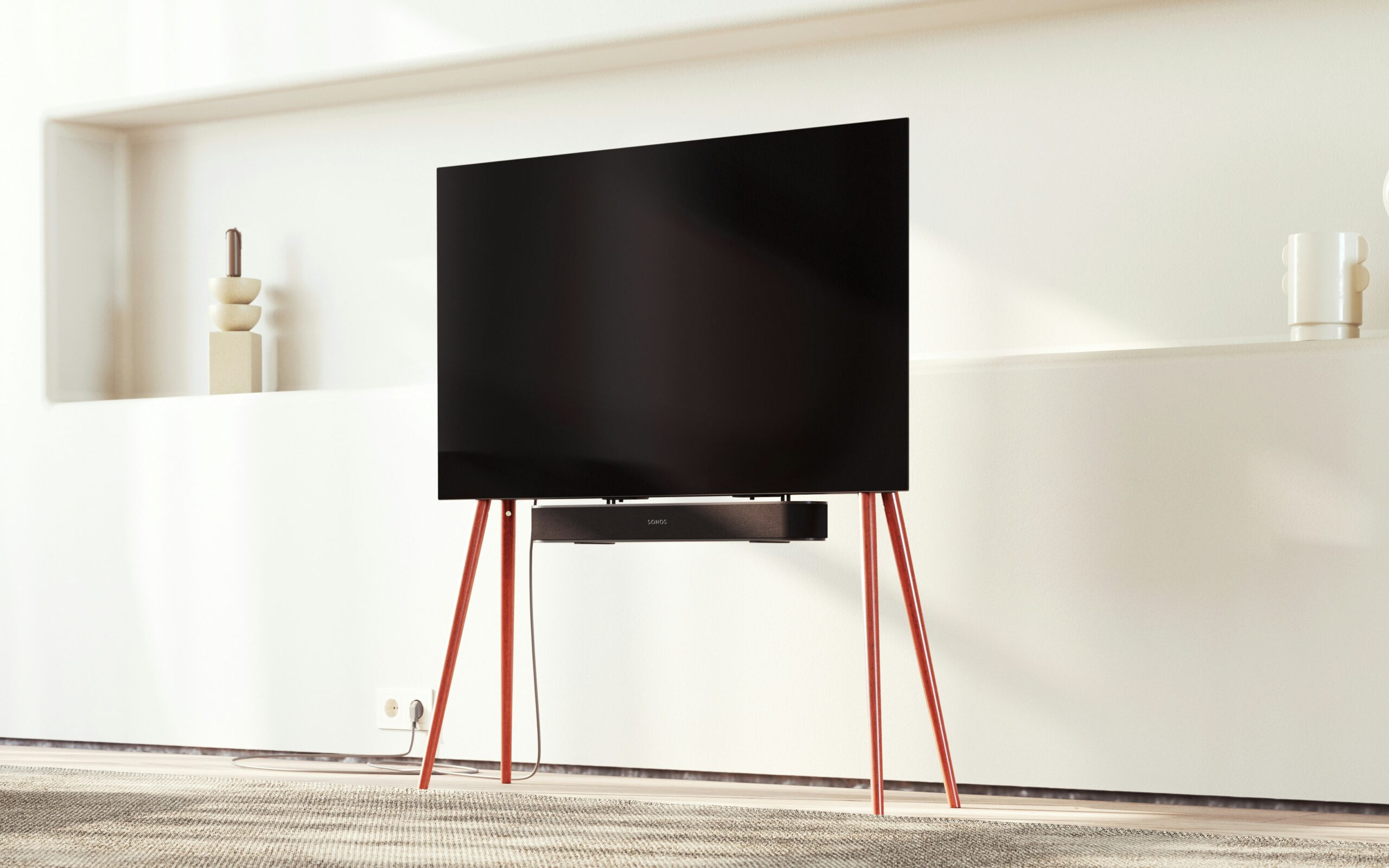
🔥 THE QUICK PICK: Need a stable TV mount without the drill holes? Our top recommendation is the FITUEYES TV Floor Stand for 32 to 60 inch TVs. It holds up to 55-inch TVs and takes 10 minutes to assemble.
The ultimate living room upgrade is a massive, ultra-thin 4K TV mounted flush against the wall. It saves floor space, looks cinematic, and hides all your messy cables.
But if you are one of the 4.6 million private renters in the UK, that dream is usually dead on arrival.
Standard plasterboard walls cannot hold the weight of a 55-inch TV. You have to use heavy-duty masonry anchors, drill deep into the brickwork, and chase cables through the plaster. If you do this without permission, you will lose your deposit instantly.
So, you end up buying a bulky, low-to-the-ground wooden TV cabinet that eats up half your living room.
The Renter Loophole? The Freestanding TV Stand.
These heavy-duty metal pillars use gravity and physics to hold your TV at “wall-mounted” height. They have flat bases that slide completely under your sofa or existing furniture, making the metal spine practically invisible. No drilling, no rawlplugs, zero damage.
We tested the best-selling models on Amazon UK to see which ones won’t tip over on thick rental carpets, which ones look like designer furniture, and which ones actually hide your cables.

Visual Comparison: The Deposit-Safe Mounts
| SPEC | FITUEYES Flat | ECOTINY Tripod | BONTEC Glass | YAHEETECH Mobile | COSTWAY Rolling |
|---|---|---|---|---|---|
| Best For | Floating Look | Studio Aesthetic | Big Screens | Budget Mobility | Heavy Duty 75″ |
| Base Type | Flat Metal Plate | 3 Wooden Legs | Tempered Glass | Lockable Casters | Heavy Duty Casters |
| Max TV Size | Up to 60″ | Up to 65″ | Up to 70″ | Up to 60″ | Up to 75″ |
| Mobility | Static | Static | Static | Fully Mobile | Fully Mobile |
| Renter Rating | |||||
| Where to Buy | Amazon | Amazon | Amazon | The Range | The Range |
The “VESA” Rule: Check Before You Buy
Before you fall in love with a stand, look at the back of your TV. You will see four threaded screw holes. The distance between these holes is your VESA pattern.
Measure the Horizontal distance (width) in millimeters.
Measure the Vertical distance (height) in millimeters.
Note: All the stands are “Universal” (fitting VESA 200×200 up to 600×400), but if you have a strange, older TV, you must verify your VESA size against the stand’s spec sheet first!
Top Pick: FITUEYES Flat Floor Stand

If you want your TV to look like it is floating against the wall, FITUEYES is the master of this illusion.
Why It’s Renter Friendly
- The “Slide-Under” Base: This is the killer feature. Instead of a chunky glass block, the base is a heavy, flat metal plate. It is thin enough to slide completely underneath a rug, a sofa, or a cheap IKEA Kallax unit.
- The Illusion: Push the metal spine flush against your skirting board, slide the base under a cabinet, and to anyone walking into the room, your TV looks perfectly wall-mounted.
Pros:
- Takes up absolutely zero usable floor space.
- Swivels left and right (great for open-plan kitchen/living rooms).
- Incredibly sturdy steel construction.
Cons:
- The flat metal base collects dust easily if left exposed.
The Studio Pick: ECOTINY Tripod Easel TV Stand

If you live in a modern, open-plan studio flat, hiding the TV isn’t always the goal. Sometimes you want it to be a piece of furniture. The Easel Stand turns your TV into an art gallery display.
Why It’s Renter Friendly
- Corner Optimisation: Because it rests on three legs, it fits flawlessly into tight corners where square cabinets simply cannot go.
- The “Scandi” Vibe: The solid beech wood legs and white metal accents match modern rental aesthetics perfectly. It stops the TV from looking like a giant black void in the middle of a bright room.
Pros:
- Gorgeous architectural design.
- Includes a small shelf for a TV box or Apple TV.
- Comes with an anti-tip wall wire (optional, but good if you have heavy-footed pets).
Cons:
You cannot push it completely flush against a wall due to the back leg angle.
The Budget/Max Size Pick: BONTEC Floor TV Stand

If you upgraded to a massive 65″ or 70″ screen and your landlord’s provided TV unit is too small to hold the legs, the BONTEC is the ultimate budget lifesaver.
Why It’s Renter Friendly
- The Price: Usually sitting around the £40 mark, this is cheaper than buying a new wooden TV cabinet.
- The Glass Base: The base is made of thick, black tempered glass. It acts as a perfect shelf to hold a Compact Soundbar or your Wi-Fi router.
Pros:
- Holds massive TVs (up to 40kg / 70 inches).
- Tempered glass base is easy to wipe clean.
- Very fast assembly (under 15 minutes).
Cons:
- The glass base is a “fingerprint and dust” magnet.
- It is slightly bulkier at floor level than the FITUEYES flat plate.
Rapid assembly Pick: Yaheetech Mobile Metal TV Stand

This is the strategic budget choice for renters who move frequently. While fixed stands are difficult to transport, this mobile unit is designed for rapid assembly and total mobility.
- The Technical Highlight: It features an inclinable bracket and height adjustment. This is the “Ergonomic Moat” for renters who use their TV as a secondary monitor for work.
- The Safety Moat: It includes four lockable casters. In an HMO where space is tight, being able to roll the TV into a corner when not in use is a major space optimisation.
- Why Renters Love It: It includes a dedicated functional shelf for a laptop or gaming console.
Heavy duty specialist pick: Costway Rolling TV Stand on Wheels

This is the heavy duty specialist. It is the only unit in our lineup that can safely support a massive 75 inch screen without requiring a wall mount or a bulky permanent cabinet.
- The Technical Highlight: It offers 6 adjustable height positions and a swivel feature of plus or minus 30 degrees. This ensures a perfect viewing angle regardless of your seating layout.
- The Deposit Moat: Heavy 75 inch TVs usually require deep wall anchors. This stand provides the same “Floating” look with zero structural impact. The casters are designed to distribute the 50kg weight capacity evenly to prevent floor indentations.
- Why Renters Love It: It features integrated cable management clips to keep wires tidy.
Annotated Manual: The “Invisible Cable” Hack
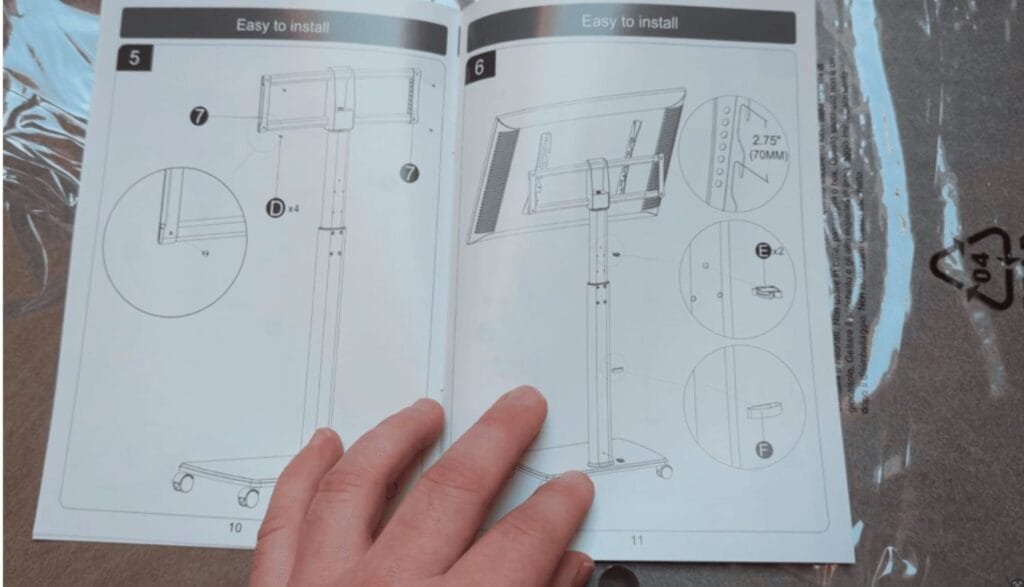
Renters are often terrified of dropping their expensive 4K TV while trying to line up screws. The beauty of these freestanding mounts is the “Drop & Lock” system, combined with built-in cable management. Here is how the manual breaks it down:
The “Drop & Lock” Installation
Mounting your 4K TV shouldn’t be a high-stakes workout.
VESA Hooks
Attach the vertical brackets to the back of your TV while it’s flat on a soft surface. Simply lift and hook the TV over the horizontal bar. No heavy lifting while searching for screw holes!
The Safety Lock
Locate the security screw at the bottom of the brackets. Tighten this to lock the TV to the frame.
Invisible Cables
Use Parts E & F (the clips) to route your HDMI and power cables down the center pole. Keeps the “floating wall mount” look intact.
- The Fix: As shown in the bottom right of the manual, these stands come with plastic ‘C-clips’ (labeled E and F).
- Action: Gather your Power, HDMI, and Soundbar cables into one bundle. Run them straight down the back of the metal spine and snap these plastic clips over them. The black metal pole completely hides the wires from view.
Real-World Reality: Community Feedback
We checked the AVForums to see where freestanding mounts fail.
MAINTENANCE
1. “The Carpet Wobble”
USER REPORT
“I put the flat base stand on my thick pile rental carpet, and the TV wobbles every time I walk past.”
💡
The Smart Tenant Fix
Metal bases compress thick carpets unevenly.
Our Advice
If your rental has deep carpets, avoid flat plate bases like the Fitueyes. Opt for a tripod stand like the ECOTINY or a rolling unit with wide casters like the Costway from The Range. These models use wider points of contact to bite through the carpet pile and reach the solid floor beneath. This is a vital safety upgrade for your [HMO Move In Essentials] kit.
MAINTENANCE
2. “The Soundbar Blockade”
USER REPORT
“I mounted the TV, but now there is a massive metal pole in the way so I can’t put my soundbar underneath it.”
💡
The Smart Tenant Fix
Freestanding mounts remove the flat surface area under your TV.
Our Advice
Look for a stand with a dedicated functional shelf like the Yaheetech model from The Range. This provides a stable platform for your soundbar that sits safely below the screen but above the base. Alternatively, ensure your chosen stand has at least five levels of height adjustment so you can mount the TV higher on the bracket to clear the central pole.
Frequently Asked Questions
Will a freestanding stand damage my rental carpet?
The heavy bases can leave indentations in thick carpets over time (just like a sofa or a heavy bookshelf). To prevent this, ensure the included rubber feet are attached, or place a small, flat piece of wood or hard plastic underneath the base plate to distribute the weight across the carpet fibers.
Can I turn the TV if the sun is glaring on the screen?
Most premium freestanding stands like the Fitueyes or the Costway from The Range include a swivel function. This typically allows for 30 degrees of rotation in either direction: which is enough to redirect the screen away from direct sunlight without moving the entire base.
Is it safe if I have a toddler?
While these stands are heavily weighted at the bottom (they easily pass safety regulations), a determined toddler climbing on a 65-inch TV could pull it down.