
The most dangerous threat to your rental deposit isn’t red wine on the carpet. It isn’t Blu-Tack marks on the wall.
It is a Slow Leak.
A loose washer on your washing machine hose. A drip under the kitchen sink. A radiator valve that weeps slightly.
You don’t notice these for months. But the water slowly seeps into the laminate flooring or the kitchen cabinetry. By the time you move out, the floor is warped, the wood is blown, and the landlord hands you a bill for £1,000+ to replace the kitchen floor.
You can’t replumb the house. But you can catch the leak the second it starts.
Smart Water Leak Sensors are tiny battery-powered pucks. You throw them under the sink or behind the washing machine. If they sense moisture, they scream an alarm and send a notification to your phone immediately.
We tested the top UK models to see which ones connect without a hub, which ones fit under low appliances, and which ones actually wake you up at 3 AM.
Visual Comparison: The “Deposit Savers”
Smart Water Sensor Comparison
| Spec | Top Pick SwitchBot Wi-Fi Leak Detector | TP-Link Tapo T300 | Meross Smart Sensor |
|---|---|---|---|
| Best For | Overall Value (No Hub) | Loud Siren (90dB) | HomeKit Users |
| Connectivity | Wi-Fi (Direct) | Sub-1GHz (Hub Req) | Wi-Fi (Hub Inc) |
| Siren Volume | 100dB (Very Loud) | 90dB (Loud) | 60dB (Quiet) |
| Probe Cable? | ✅ Included | ❌ Puck Only | ✅ Included |
| Renter Rating | ★★★★★ | ★★★★☆ | ★★★★☆ |
The “Hub” Trap: Read Before Buying
Most smart sensors use Zigbee (a low-power radio signal) which means they cannot talk to your phone directly. They need a “Bridge” or “Hub” plugged into the wall to translate the signal.
- SwitchBot (Our Top Pick): Connects directly to Wi-Fi. No extra box needed.
- Tapo: Requires the H100 Hub. If you don’t own one, the sensor is a paperweight.
- Meross: Usually comes with a small hub in the box.
1. Top Pick: SwitchBot Wi-Fi Water Leak Detector
SwitchBot has cracked the code for renters. They realised that people don’t want to buy a £30 Hub just to use one £14 sensor. This version connects straight to your router.
Why It’s Renter Friendly
- The “Extension Probe”: This is the killer feature. It comes with a sensor attached to a long cable.
- The Hack: You can mount the main battery unit on the wall (easy to reach) and dangle the tiny sensor probe underneath the washing machine. If the machine leaks, the sensor catches it, but the battery unit stays dry.
- Ecosystem: It lives in the same app as your SwitchBot Lock and Curtains. One app for everything.
Pros:
- Loudest siren (100dB) – you will hear this from the bedroom.
- Instant phone alerts via Wi-Fi.
- IP67 Waterproof (it survives being submerged).
Cons:
- Batteries drain faster than Zigbee sensors (because Wi-Fi uses more power).
- The “No Hub” version is slightly bulkier than the Tapo.
2. The “Loud” Pick: TP-Link Tapo T300
If you already have the Tapo H100 Hub (perhaps you bought it for a smart doorbell button or motion sensors), this is the best addition.
Why It’s Renter Friendly
- 90dB Siren: Most leak sensors just beep quietly. The T300 screams like a smoke alarm. If a pipe bursts at 2 AM, you want to wake up now, not find a puddle in the morning.
- One-Click Silence: If it goes off accidentally (e.g., you mopped the floor), you can silence it instantly by pressing the button on the top. No scrambling to open an app.
Pros:
- Incredible battery life (1.5+ years).
- Tiny footprint (looks like a small white pebble).
- Super reliable connection via the Hub.
Cons:
- MUST have the Tapo Hub. Do not buy this standalone.
- No extension probe (must sit flat on the floor).
3. The “Apple” Pick: Meross Smart Water Leak Sensor
If you use an iPhone and Apple HomeKit to run your flat, Meross is the native choice.
Why It’s Renter Friendly
- HomeKit Alerts: When a leak is detected, it pushes a “Critical Alert” to your iPhone. This bypasses “Do Not Disturb” mode. Even if your phone is on silent at night, this alert will sound.
- Conductive Legs: It uses three metal feet on the bottom. It triggers if the water level rises by just 0.5mm. It catches the tiniest drips before they soak into the wood.
Pros:
- Integrates with Apple, Alexa, and Google.
- Comes with a small dedicated hub in the box to ensure range.
- Probe cable included.
Cons:
- The siren on the device itself is quiet. It relies on your phone to wake you up.
Annotated Manual: The “Placement Map”
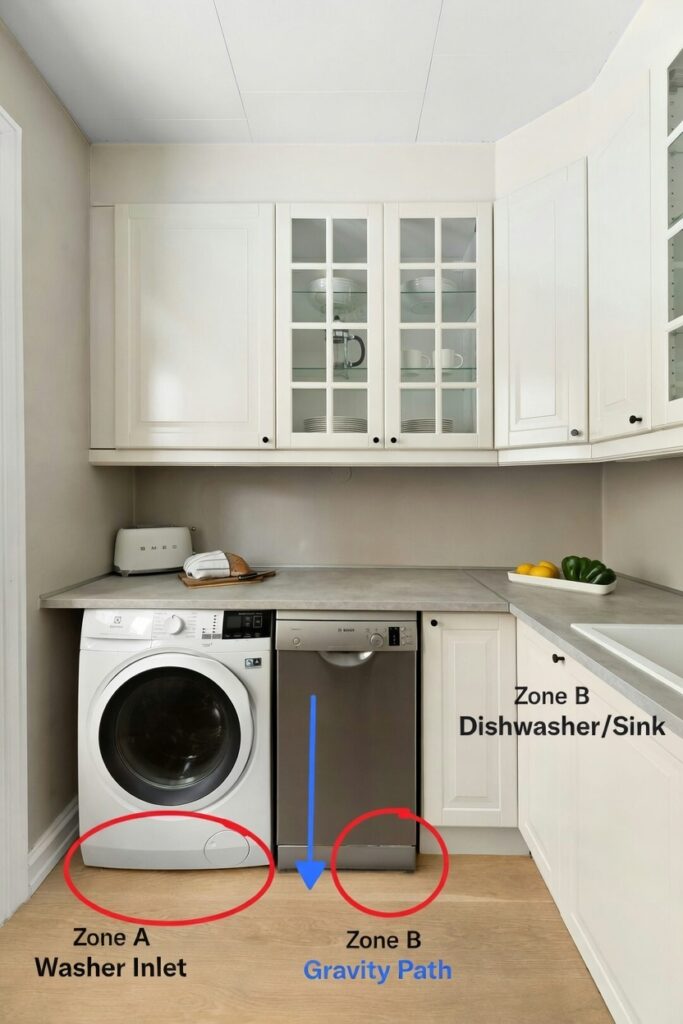
Buying the sensor is useless if you put it in the wrong place. Water follows gravity and slopes. Here is exactly where to place them for maximum protection.
Zone 1: The “U-Bend” Trap
Open the cupboard under your kitchen sink.
- The Mistake: Placing the sensor right in the middle of the cupboard.
- The Fix: Place it directly underneath the P-Trap (the U-shaped pipe). This is where leaks always start. If you have a lot of cleaning products in there, clear a small 10cm circle so the sensor sits flat.
Zone 2: The Washing Machine Gap
Washing machines usually leak from the “Inlet Hose” at the back.
- The Problem: You can’t reach behind the machine.
- The Fix: Use the SwitchBot Probe. Stick the battery unit to the side of the machine (using the magnet or tape) and slide the small probe cable underneath the machine towards the back wall.
Zone 3: The “Lowest Point”
Look at your bathroom floor. Is it perfectly flat? Probably not.
Pour a tiny amount of water (a teaspoon) on the floor and see which way it runs. Place the sensor at the lowest point where water naturally pools.
Real-World Reality: Community Feedback
We checked the smart home subreddits to see the failure points.
MAINTENANCE
1. “The Mop Trigger”
USER REPORT
“I mopped the kitchen floor and set off the alarm. My phone blew up with notifications at work.”
💡
The Smart Tenant Fix
These sensors are extremely sensitive. A wet mop is enough to trigger them.
Our Advice
Pick the sensor up before you mop! If you forget, don’t panic. Dry the metal contacts on the bottom with a paper towel immediately.
MAINTENANCE
2. “The Wi-Fi Dead Zone”
USER REPORT
“I put the sensor under the sink, and it went offline. The thick wood cupboard doors block the signal.”
💡
The Smart Tenant Fix
Kitchen cupboards are Faraday cages (wood + pipes + metal sinks).
Our Advice
If using the SwitchBot (Wi-Fi), check the signal strength in the app before you stick it down. If it is weak, use the Probe Cable. Keep the sensor body outside or high up in the cupboard, and drop only the small cable down to the dark, signal-blocked area.
Frequently Asked Questions
Do these shut off the water automatically?
No. These are sensors only. They alert you so you can run to the stopcock. To shut off water automatically, you need a motorized valve (like the Grohe Sense Guard), which requires a plumber to cut pipes. Definitely not renter friendly!
Will it work if I am not home?
Yes. As long as your Wi-Fi is on, the sensor will send a push notification (and usually an email) to your phone anywhere in the world. You can then call your landlord or a neighbour to investigate.
Can I stick it to the floor?
You can (some come with tape), but we recommend against it. You need to be able to pick it up to change batteries or dry it off if it gets wet. Just lay it flat on the floor. Gravity will keep it in place.
Verdict: Which One Saves Your Deposit?
- Best Overall: SwitchBot Wi-Fi Leak Detector. It requires no hub, connects easily, and the included probe cable makes it the most versatile for tight rental spaces.
- Best for Tapo Users: Tapo T300. If you already have the H100 hub, this is a no-brainer. It’s loud, small, and the battery lasts forever.
- Best for Apple Users: Meross. The “Critical Alerts” on iPhone are a lifesaver for night-time leaks.