When you move into a UK rental, the first thing you do is set up the broadband. A few days later, a cheap plastic box arrives from BT, Virgin Media, or Sky.
You plug it into the master socket in the hallway. The Wi-Fi works great in the living room. But the moment you walk into the bedroom, close the door, and try to stream Netflix… the dreaded buffering wheel appears.
Worse still, your new Smart Doorbell drops offline constantly because the Wi-Fi can’t punch through your thick front door.
The problem isn’t your internet speed. The problem is the landlord’s walls.
Victorian brick, solid concrete, and modern foil-backed plasterboard are absolute kryptonite to Wi-Fi signals. And since you rent, you can’t drill holes to run ethernet cables through the flat.
The solution? Plug-in Wi-Fi Extenders and Mesh Systems.
These devices plug into a standard wall socket, catch the dying Wi-Fi signal from your hallway, amplify it, and blast it into the dead zones.
We cut through the confusing tech jargon to test the best boosters for UK flats.
| Spec | TP‑Link RE315 Extender |
TP‑Link Deco M4 Mesh |
Netgear EX6110 Extender |
|---|---|---|---|
| Best For | Fixing one dead room | Whole flat coverage | Netgear loyalists |
| Type | Plug‑in repeater | 3‑node mesh system | Plug‑in repeater |
| Speed | AC1200 | AC1200 | AC1200 |
| Setup Time | 2 minutes (WPS button) | 10 minutes (app) | 2 minutes (WPS button) |
| Renter Rating |
Mesh vs. Extenders: What’s the Difference?
Before you buy, you need to know what you’re actually trying to fix in your home Wi‑Fi.
It catches your existing Wi‑Fi and creates a second network, for example: “SkyRouter_EXT”.
You plug one cylinder into your router and place the others around the flat. Together they create a large, invisible “blanket” of Wi‑Fi.
Ideal if you have multiple smart devices and want stable coverage everywhere. Read Article #9
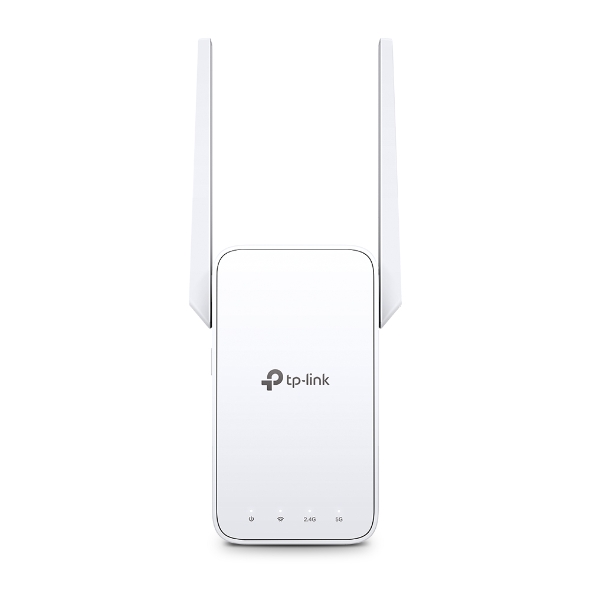
1. Top Pick (Single Room): TP-Link RE315 Extender
If you just need to get Wi-Fi into your bedroom or out to your balcony for your Smart Outdoor Lights this is the undisputed king of Amazon UK.
Why It’s Renter Friendly
- The “WPS” Setup: You don’t need an IT degree. You press the “WPS” button on your Virgin/BT router, then press the big button on the front of this plug. They find each other and connect in 60 seconds.
- Compact Design: It plugs directly into the wall socket. It doesn’t have a messy power cable trailing across the floor.
Pros:
- Incredibly cheap (usually under £30).
- Dual-band (uses both 2.4Ghz for range and 5Ghz for speed).
- Smart signal light tells you if you placed it too far away.
Cons:
- Creates a separate network name you have to connect to.
- Halves the top speed of your internet in that specific room (fine for Netflix, bad for downloading massive Xbox games).
2. The “Whole Flat” Pick: TP-Link Deco M4 (3-Pack)
If your landlord’s router is useless and your whole flat drops connection constantly, you need to bypass their router entirely. The Deco M4 Mesh System is the professional renter’s choice.
Why It’s Renter Friendly
- Bypassing the ISP: You plug the main Deco cylinder into your BT/Virgin hub using an ethernet cable. You then turn off the Wi-Fi on the BT hub. The Deco takes over and handles everything. It is infinitely more powerful than the free router your internet provider gave you.
- No Drilling: You get 3 stylish cylinders. Put one in the hall, one in the lounge, one in the bedroom. They talk to each other wirelessly to cover up to 4,000 sq ft.
Pros:
- Seamless roaming (no switching networks as you walk around).
- Can handle up to 100 devices (essential for Smart Homes).
- The Deco App makes managing your internet incredibly easy.
Cons:
- High Ticket: Costs over £100.
- The cylinders require shelf space and plug sockets.
3. The Alternative Plug-in: Netgear EX6110
If you prefer Netgear products or the TP-Link is out of stock, the EX6110 is the direct rival. It does exactly the same job for roughly the same price.
Why It’s Renter Friendly
- FastLane Technology: If you are a gamer or stream 4K video, this model has a specific mode that uses both Wi-Fi bands simultaneously to establish a high-speed connection to the router.
- No Antennas: Unlike the TP-Link which has two antennas sticking out, the Netgear is an internal antenna design. It looks a bit cleaner and less techy plugged into a hallway socket.
Pros:
- Clean, antenna-free design.
- Very reliable connection stability.
Cons:
Setup via the web browser can be slightly clunkier than TP-Link’s app if the WPS button fails.
Annotated Manual: The “Halfway Rule”
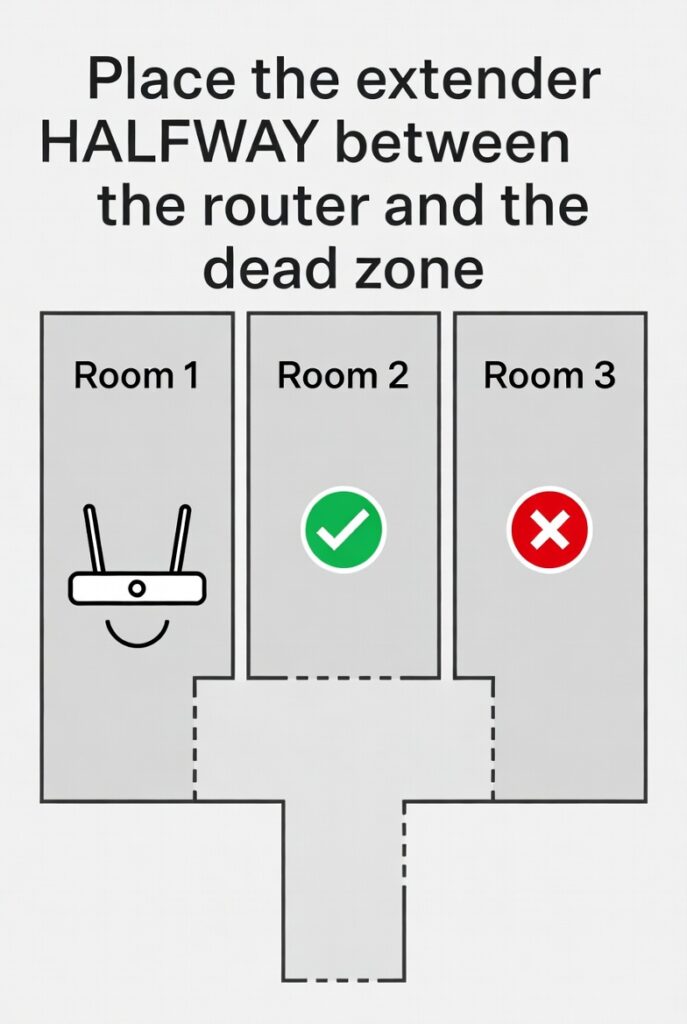
The #1 reason people leave 1-star reviews on Wi-Fi extenders is because they install them incorrectly.
The Mistake:
People have a dead zone in their bedroom. So, they plug the extender into the bedroom wall.
- Why this fails: An extender can only amplify the signal it receives. If the bedroom has 0% Wi-Fi, the extender receives 0% Wi-Fi, and blasts out 0% Wi-Fi.
The “Halfway” Fix:
- Find the Edge: Walk from your router towards the dead zone with your phone.
- Check the Bars: Stop the exact moment your phone drops from 3 Wi-Fi bars down to 2 Wi-Fi bars.
- Plug it in: Find the nearest wall socket to that exact spot (usually a hallway).
- The Result: The extender is close enough to the router to catch a strong signal, but close enough to the bedroom to blast that strong signal through the final wall.
Real-World Reality: Community Feedback
We checked the networking forums to find the common rental issues.
MAINTENANCE
1. “My Smart Bulbs Won’t Connect”
USER REPORT
“I bought a Wi-Fi extender, but my smart plugs and bulbs refuse to connect to it”.
💡
The Smart Tenant Fix
Almost all smart home devices only run on the 2.4GHz band.
Our Advice
When setting up your extender, log into the app and ensure the 2.4GHz band is broadcasting. Sometimes, modern extenders try to force devices onto the faster 5GHz band, which smart bulbs cannot “see”.
MAINTENANCE
2. “The Thick Wall Blockade”
USER REPORT
“Even with the extender, the signal won’t go through the solid concrete wall into my kitchen extension”.
💡
The Smart Tenant Fix
If walls are too thick (or have foil insulation), Wi-Fi simply cannot pass through.
Our Advice
If standard extenders fail, return them and buy a Powerline Adapter. These use your flat’s electrical copper wiring to transmit the internet through the walls, bypassing the concrete entirely.
Frequently Asked Questions
Do I need to tell my landlord I am using a Wi-Fi extender?
No. Plug-in extenders and mesh systems do not alter the physical broadband line or the master socket. They are simply electronic devices you plug into a wall, just like a toaster or a TV.
Will an extender make my internet speed faster?
No. An extender cannot give you more speed than you pay for. If you pay Virgin Media for 50Mbps, the absolute maximum the extender can output is 50Mbps. An extender gives you Range, not Speed..
How do I connect my Sky Q box to the new extender?
If you are using the TP-Link or Netgear plug-in extenders, you will need to go to the Network Settings on your Sky Q box and manually search for the new network name (usually ending in _EXT) and type in the password.
Verdict: Which One for Your Flat?
- Best for Single Rooms: TP-Link RE315. The easiest, cheapest way to get Wi-Fi into a dead bedroom or out to a balcony.
- Best for Smart Homes / Large Flats: TP-Link Deco M4. Stop fighting your landlord’s terrible router. Buy this Mesh system, cover your whole flat, and take it with you when you move out.
- Best Antenna-Free Design: Netgear EX6110. A reliable, clean-looking alternative to the TP-Link.