
Waking up to natural sunlight streaming through your window is the ultimate morning luxury. But if you rent a flat in the UK, your landlord probably installed the cheapest, most basic blinds available.
Usually, this means flimsy vertical slats with a twisting wand, or basic roller blinds with a plastic beaded chain.
You can’t rip them down and install custom £500 motorised smart blinds.
But you can make the landlord’s cheap blinds smart.
The solution? Retrofit Blind Motors.
These are small, battery-powered robots that attach to your existing blinds. They physically turn the wand or pull the chain for you. They install in 5 minutes using 3M adhesive tape (no drilling required), and they connect to your phone so you can schedule them to open at sunrise.
We tested the best no-drill options on Amazon UK to see which ones handle heavy roller blinds, which ones have the best solar panels, and which ones integrate seamlessly with Alexa.
Smart Blind Motor Comparison (2026)
The “Blind Type” Warning (Crucial)
If you buy the wrong robot, it will not work.
1. Venetian / Vertical Blinds
Controlled by twisting a long plastic/metal stick (the “Wand”)
2. Roller Blinds
Rolled up/down by pulling a looped bead chain
A chain puller cannot twist a wand.
Look → Bead chain loop? → Aqara E1 or AyGwbys
1. The Venetian Pick: SwitchBot Blind Tilt
If your rental flat has slatted blinds, the SwitchBot Blind Tilt is a piece of engineering genius. It simply clips onto the twisting wand.
Why It’s Renter Friendly
- Infinite Power: It comes with a tiny, sleek solar panel that sticks to the glass behind the blind. Even in the gloomy UK winter, ambient daylight is enough to keep the internal battery charged forever. You never have to take it down to plug it in.
- Light Sensing: Because it has a light sensor on the solar panel, you can set it to automatically tilt the blinds closed when direct sunlight hits the window (to keep the flat cool in summer), and open them when the sun passes.
Pros:
- Installs in 3 minutes (literally just clips on).
- Solar power means zero maintenance.
- The motor is surprisingly quiet.
Cons:
- It only tilts the slats open and closed. It cannot physically pull the entire blind up to the top of the window.
- To control it when you are away from home (or via Alexa), you must buy the SwitchBot Hub Mini separately.
2. The Premium Roller Pick: Aqara Roller Shade Driver E1
If you have a roller blind with a beaded chain, you need a wall-mounted motor. Aqara makes the most premium, reliable version on the market.
Why It’s Renter Friendly
- The 3M Mount: While it comes with screws, the backplate is perfectly flat and designed for strong 3M double-sided tape. You can stick it directly to the uPVC window frame or the painted wall without drilling.
- Battery Life: It has a massive rechargeable battery that lasts for roughly 2 months. When it needs charging, you just slide the motor off the wall bracket and plug it into a USB-C cable.
The “Hub” Catch
You must understand this before buying: The Aqara E1 uses Zigbee. It does not have Wi-Fi. This means it cannot connect directly to your router. You must own an Aqara Smart Hub (like the Hub M2 or E1 USB stick) for this to work. If you already have an Aqara setup, this is a no-brainer. If not, factor in the cost of the hub.
Pros:
- Premium build quality and very reliable motor.
- Integrates beautifully with Apple HomeKit.
- Sleek, unobtrusive design.
Cons:
- Requires an Aqara Hub.
- Not suitable for very heavy, thick blackout blinds (max weight ~3kg).
3. The Budget/No-Hub Roller Pick: AyGwbys Chain Roller Motor
If you have roller blinds but don’t want to invest in an expensive Aqara Smart Hub, this generic Tuya-powered Wi-Fi Motor is the perfect workaround.
Why It’s Renter Friendly
- Direct Wi-Fi: Unlike the Aqara, this motor has a Wi-Fi chip built-in. It connects directly to your home router. You can use the free “Smart Life” or “Tuya” app to set schedules and connect it to Alexa/Google Home immediately, straight out of the box.
- Custom Limits: The app allows you to set precise “Top” and “Bottom” limits. If you only want the blind to open halfway to stop people looking in from the street, you can program that exact stopping point.
Pros:
- No extra hub required (cheaper overall setup).
- Works instantly with Alexa and Google Assistant.
- Includes different “gears” in the box to fit different bead sizes.
Cons:
- The brand name is unpronounceable (it’s a generic white-label product).
- The “Smart Life” app isn’t as polished as Aqara or SwitchBot.
Annotated Manual: The “Bead Size” Check
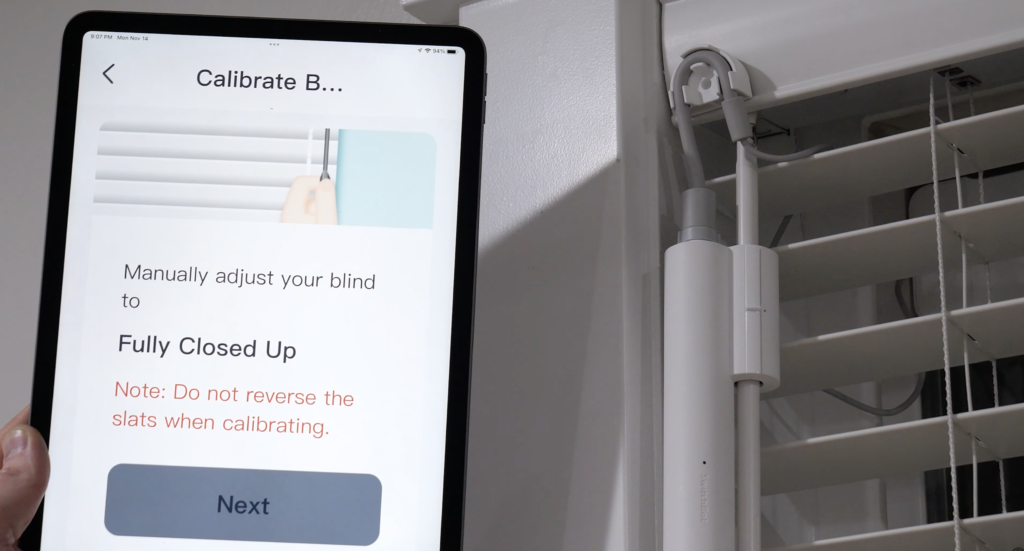
Installing the SwitchBot Blind Tilt is physically easy. It just wraps around the existing plastic wand. However, the software setup is where renters make costly mistakes.
If you don’t calibrate the motor’s limits correctly, the robot will try to keep twisting a blind that is already fully closed. The motor is surprisingly strong; it will easily snap a cheap plastic rental blind, costing you your deposit.
SwitchBot Blind Tilt Calibration Guide
How to navigate the calibration screen safely and avoid common issues
“Fully Closed Up” Position
The app will ask you to manually twist the wand until the blinds are pointing Fully Closed Up (slats facing the ceiling).
The Trick: Do not force it until it is bone-tight. Twist it until it is just closed. Give the motor a tiny bit of slack to prevent gear wear.
The “No Reverse” Rule
As highlighted in red on the app screen: “Do not reverse the slats when calibrating.”
Why this matters: The internal robot needs to learn the exact physical distance between “Open” and “Closed.” If you twist it closed, realize you went too far, and twist it back slightly during this step, the robot loses its “Zero Point.” It will be permanently confused.
The “Recalibration” Fix
If your blinds start leaving a 1-inch gap when they are supposed to be closed, don’t panic. The gears haven’t broken; the software has just “drifted” over a few weeks of use.
Simply open the settings in the SwitchBot app and run this Calibration sequence again to reset the limits.
Quick Tip: Always follow the app prompts exactly during first calibration — and re-calibrate every few months if you notice small drift.
Based on SwitchBot Blind Tilt best practices • Images for illustration only
Real-World Reality: Community Feedback
We checked the Amazon reviews and Reddit’s r/ApartmentHacks to find the common pitfalls.
MAINTENANCE
1. “The Sagging Motor”
USER REPORT
“I used the sticky pads to mount the chain puller to my wall. After a week of pulling the heavy blind up, the motor peeled off the paint and fell.”
💡
The Smart Tenant Fix
Pulling a heavy blind up creates significant downward force on the adhesive.
Our Advice
If your blind is large (e.g., covering a patio door), standard 3M tape on painted plaster might fail. For heavy blinds, you must stick the motor to the uPVC window frame (plastic), not the painted wall. The bond on smooth plastic is 10x stronger than on porous paint.
MAINTENANCE
2. “The SwitchBot Calibration Drift”
USER REPORT
“My SwitchBot Blind Tilt used to close the slats perfectly tight. Now there’s a gap and people can see in.”
💡
The Smart Tenant Fix
Over hundreds of twists, the internal motor loses its exact “zero” point.
Our Advice
This is an easy fix. Once a month, open the SwitchBot app, go to Settings, and hit “Recalibrate.” It takes 60 seconds to reset the open/closed limits, and it will seal tightly again.
Frequently Asked Questions
Can I still open the blinds manually?
SwitchBot Tilt: Yes. You can still gently twist the wand by hand. Roller Chain Motors: Generally, No. The motor holds the chain tightly in its gears. If you yank the chain manually, you will strip the plastic gears inside the machine. You must use the app, voice control, or the physical buttons on the motor itself to move the blind.
Will the roller motor pull up a huge, heavy blackout blind?
Be careful. These motors are designed for standard household blinds (up to roughly 3kg). If you have a massive 2-metre wide, thick thermal blackout blind, the motor might struggle or drain its battery very quickly. They work best on standard fabric rollers.
Do I need a smart plug for these?
No. All these devices have their own batteries and connect to apps wirelessly. You do not need to use a smart plug to control them.
Verdict: Which Robot for Your Windows?
- Best for Slatted Blinds: SwitchBot Blind Tilt. The solar panel makes it a true “set and forget” device. Just remember it tilts, but doesn’t lift.
- Best for Roller Blinds (Premium): Aqara Roller Shade Driver E1. If you already have an Aqara hub or use Apple HomeKit, the build quality and reliability here are unmatched.
- Best for Roller Blinds (Budget/No Hub): AyGwbys Wi-Fi Chain Motor. If you want a standalone, direct-to-Alexa solution without buying extra hubs, this generic Tuya motor is the perfect fix.